Setting up Proxmox-backed VPC Subnets
Enable the opt-in proxmox-network package, prepare the Proxmox VE hosts, the cluster nodes and the transit network, and operate the zones that back tenant VPC subnets with Proxmox VLANs.
You are viewing documentation for Cozystack next, which is currently in beta. For the latest stable version, see the v1.6 documentation.
After you’ve created a VPC with a number of Subnets, it is time to attach workloads to it. Currently, only virtual machines support subnets attachment.
First, you need to determine IDs of subnets. IDs are auto-generated from resource names you specified during creation. Check it on the Details tab of your VPC.
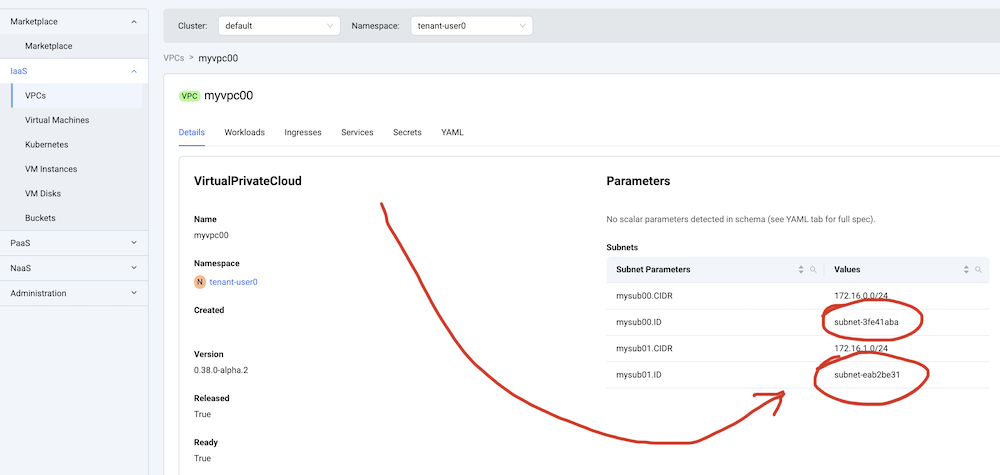
While creating a VM, fill in subnets IDs in Subnets part of a resource settings.
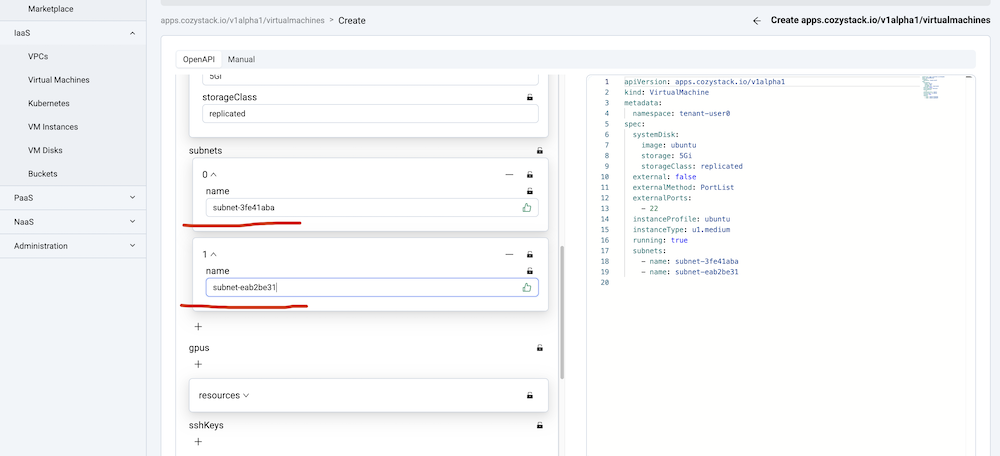
Each subnet will be represented as a secondary network interface. For some guest operating system distributions, you will need to add network interface configuration to the virtual machine’s user-data. You can also bring secondary interfaces up manually, getting IP addresses from DHCP.
Enable the opt-in proxmox-network package, prepare the Proxmox VE hosts, the cluster nodes and the transit network, and operate the zones that back tenant VPC subnets with Proxmox VLANs.